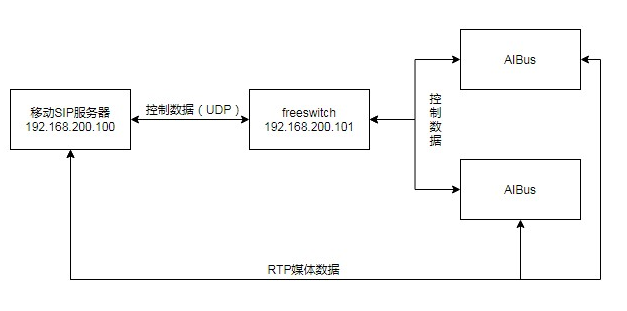
拉取docker镜像
镜像包获取地址: https://hub.docker.com/r/safarov/freeswitch
镜像拉取命令: docker pull safarov/freeswitch
安装声音文件
docker volume create —name freeswitch-sounds
启动freeswitch容器
docker run --net=host --name freeswitch -e SOUND_RATES=8000:16000 -v freeswitch-sounds:/usr/share/freeswitch/sounds -v /etc/freeswitch/:/etc/freeswitch safarov/freeswitch
修改配置文件
接入SIP外部专线
修改freeswitch监听IP
1
2
3
4
5
6
7
8
9
| 打开文件 /etc/freeswitch/vars.xml
1、搜索 <X-PRE-PROCESS cmd="set" data="domain=$${local_ip_v4}"/> (63行左右)
2、在 <X-PRE-PROCESS cmd="set" data="domain=$${local_ip_v4}"/> 所在行前增加以下两行配置,其中需修改 xxx.xxx.xxx.xxx 为指定IP
<X-PRE-PROCESS cmd="set" data="force_local_ip_v4=xxx.xxx.xxx.xxx"/>
<X-PRE-PROCESS cmd="set" data="local_ip_v4=$${force_local_ip_v4}"/>
3、添加白名单
vim /etc/freeswitch/autoload_configs/acl.conf.xml
<list name="domains" default="deny">标签内添加如下,其中IP更改为aibus所在的IP
<node type="allow" cidr="192.168.200.101/24"/>
|
进入 /etc/freeswitch/sip_profiles/external/ 目录
拷贝 example.xml (cp example.xml gwl.xml)
修改gwl.xml文件
1
2
3
4
5
6
7
| 修改移动专线的链接地址
<param name="realm" value="192.168.0.1"/>
修改不进行注册
<param name="register" value="false"/>
修改传递头部参数
<param name="caller-id-in-from" value="true"/>
<param name="History-Info-in-form" value="true"/>
|
修改拨号计划
进入/etc/freeswitch/dialplan/public
拷贝示例文件(cp 00_inbound_did.xml mobile.xml)
修改网关拨号计划配置
注意点:
1、extension name需要与文件名(去除文件后缀名)一致
2、condition 的expression内 xxxxxx需要改成SIP的电话号码
1
2
3
4
5
6
7
8
9
| <include>
<extension name="mobile">
<condition field="destination_number" expression="^(xxxxxx)$">
<action application="set" data="domain_name=$${domain}"/>
<action application="lua" data="/etc/freeswitch/scripts/load.lua"/>
<action application="transfer" data="${destination_number} XML default"/>
</condition>
</extension>
</include>
|
修改默认拨号计划(vim /etc/freeswitch/dialplan/default.xml)
1
2
3
4
5
6
7
8
9
10
| 增加负载均衡配置(说明:xml文件有节点 include context等,需将下部代码添加至context节点子集,并位于context节点子集的最开始部分,一下为代码):
<extension name="Balance_load">
<condition field="destination_number" expression="^(10[01][0-9])$">
<action application="export" data="dialed_extension=$1"/>
<action application="set" data="sip_h_History-Info=${sip_history_info}"/>
<action application="set" data="hangup_after_bridge=true"/>
<action application="bridge" data="user/${dialed_extension}@${domain_name}"/>
</condition>
</extension>
|
负载均衡lua脚本创建
1
2
3
4
5
6
7
8
9
10
11
12
13
14
15
16
17
18
19
20
21
22
23
24
25
26
27
28
29
30
| 创建目录文件(mkdir -p /etc/freeswitch/scripts)
创建并编辑文件(vim /etc/freeswitch/scripts/load.lua)
拷贝以下lua脚本代码至 load.lua 脚本
api=freeswitch.API()
local dest_number = session:getVariable("destination_number");
local phone=dest_number;
while(true)
do
local loadNumber=tonumber(api:execute("hash","select/load/loadNum"));
if (not loadNumber) then
loadNumber=0;
end
loadNumber = loadNumber + 1;
api:execute("hash","insert/load/loadNum/" .. loadNumber)
local loadNumberMod = loadNumber % 20;
if(loadNumberMod < 10) then
phone = "100" .. loadNumberMod
else
phone = "10" .. loadNumberMod
end
regList=api:execute("sofia","status profile internal reg " .. phone);
result=regList.find(regList,"Total items returned:");
local total=string.sub(regList,result+21,result+22);
if(total and tonumber(total) > 0) then
break
end
end
session:setVariable("destination_number",phone);
|
修改freeswitch默认账号密码
vim /etc/freeswitch/vars.xml
查找 default_password=
修改“=”后边字符串,则将默认密码修改为该字符串,建议更改为1234
启动freeswitch
docker start freeswitch
freeswitch连接mysql
yum install unixODBC-devel.x86_64
wget http://www.percona.com/redir/downloads/Percona-XtraDB-Cluster/5.5.37-25.10/RPM/rhel6/x86_64/Percona-XtraDB-Cluster-shared-55-5.5.37-25.10.756.el6.x86_64.rpm
rpm -ivh Percona-XtraDB-Cluster-shared-55-5.5.37-25.10.756.el6.x86_64.rpm
yum install mysql-connector-odbc.x86_64
vim /etc/odbc.ini
1
2
3
4
5
6
7
| [freeswitch]
Driver = MySQL
SERVER = 10.0.0.1
PORT = 3306
DATABASE = freeswitch
USER = root
PASSWORD = sdi#^&&(ks*()
|
附录(freeswitch外部网关网络)