大道至简

学必求其心得,业必贵于专精。

0%

使用方法:创建为.xcs的文件,导入xshell即可;

SolarizedDarkModify

[SolarizedDarkModify]
text=839496
cyan(bold)=00ffff
text(bold)=e9e9e9
magenta=c000c0
green=80ff00
green(bold)=3c5a38
background=042028
cyan=00c0c0
red(bold)=ff0000
yellow=c0c000
magenta(bold)=ff00ff
yellow(bold)=ffff00
red=ff4500
white=c0c0c0
blue(bold)=1e90ff
white(bold)=fdf6e3
black=000000
blue=00bfff
black(bold)=808080
[Names]
name0=SolarizedDarkModify
count=1

colorfulcolors

[colorfulcolors]
text=ffffff
text(bold)=ffffff
background=000000
black=151515
black(bold)=696969
red=ff8eaf
red(bold)=ed4c7a
green=a6e25f
green(bold)=a6e179
yellow=f8e578
yellow(bold)=ffdf6b
blue=a6e2f0
blue(bold)=79d2ff
magenta=e85b92
magenta(bold)=bb5d79
cyan=5f868f
cyan(bold)=87a8af
white=d5f1f2
white(bold)=e2f1f6
[Names]
name0=colorfulcolors
count=1

isayme

[isayme]
text(bold)=eaeaea
magenta(bold)=ff00ff
text=ffffff
white(bold)=eaeaea
green=00c000
red(bold)=d20000
green(bold)=00ff00
black(bold)=808080
red=c00000
blue=113fcc
black=000000
blue(bold)=0080ff
yellow(bold)=ffff00
cyan(bold)=00ffff
yellow=c0c000
magenta=c000c0
background=222222
white=c0c0c0
cyan=00c0c0
[Names]
count=1
name0=isayme
阅读全文 »

1
2
3
4
mv /etc/yum.repos.d/CentOS-Base.repo /etc/yum.repos.d/CentOS-Base.repo.backup
wget -O /etc/yum.repos.d/CentOS-Base.repo http://mirrors.aliyun.com/repo/Centos-7.repo
yum clean all
yum makecache

4.3 系统初始化

4.3.0 先他妈yum update一下,别问为什么,问就是坑

4.3.1 关闭防火墙(所有节点)

• 关闭防火墙
systemctl stop firewalld
• 禁止防火墙开机自启
systemctl disable firewalld

4.3.2 关闭selinux(所有节点)

1
2
3
4
5
6
• 永久关闭
# 永久
sed -i 's/enforcing/disabled/' /etc/selinux/config
• 临时关闭(不建议使用这条命令)
# 临时
setenforce 0

4.3.3 关闭swap分区(所有节点)

1
2
3
4
5
6
reboot
• 永久关闭swap分区
# 永久
sed -ri 's/.*swap.*/#&/' /etc/fstab
• 临时关闭swap分区(不建议使用这条命令)
swapoff -a

4.3.4 配置主机名(所有节点)

阅读全文 »

知识必备:Linux操作系统、Sip协议

安装

依赖包安装:

1
2
3
4
5
6
yum -y install gcc-c++
yum -y install ncurses-devel
yum -y install openssl-devel
# 为了安装libpcap,还需要安装以下两个开发包:
yum -y install flex
yum -y install bison

安装libcap

下载libcap :http://www.tcpdump.org/release/

1
2
3
4
5
6
wget http://www.tcpdump.org/release/libpcap-1.9.1.tar.gz
tar zxvf libcapXXX.gz

login as root , go to folder libpcapXXX and install it. run:
./configure
make && make install

安装libnet (可跳过)

下载libnet :

1
2
3
4
5
6

tar zxvf libnetXXX.gz
# 切换root , 去libpnetXXX目录:
./configure
. /make
./make install
阅读全文 »

项目背景及工具

面对庞大的运营商用户群体,对整个电话系统的抗压能力,需要做完整的全链路压测

1
2
3
4
5
6
在做测试工作之前,需要熟悉sip协议、sipp、linux、xml、jmeter
使用工具:
信令压测工具:SIPp
http压测工具:Jmeter
TCP压测工具:语音组自己写的工具
监控系统:Zabbix

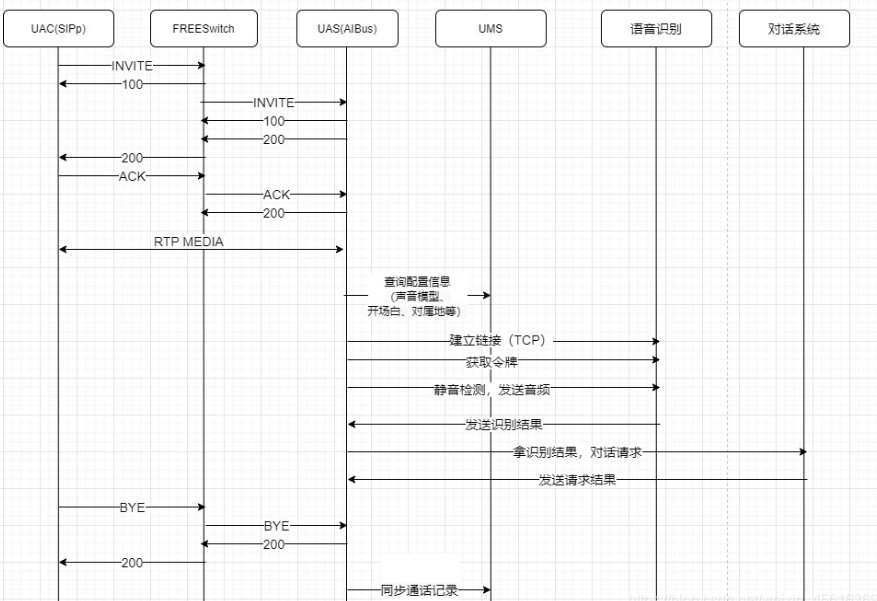
系统测试流程架构

uac_and_uas

分解步骤:

1
2
3
4
5
6
7
uac、uas注册到freeswitch
uac发起呼叫
freeswitch转接被叫人电话至aibus
建立通话、流媒体传输
aibus从ums查询配置信息;调用语音识别服务获取令牌、发送音频进行语音识别、拿到识别结果请求对话系统
uac挂断电话
aibus同步通话记录

测试准备

1
2
3
4
5
6
7
注册脚本
呼叫脚本
被叫处理脚本
接口压测脚本(jmeter界面化编写)
部署jmeter和sipp在单独的服务器
监控系统部署
freeswich和aibus发布压测版本

测试策略

阅读全文 »

AIBus落地部署配置说明

1、包结构说明

aibus
--conf                      配置文件目录
--bin                       脚本目录
--lib                       运行所需jar包目录

2、配置说明

amqp.properties                    RabbitMq 配置说明
app-deploy.properties              程序运行参数
application.properties             程序启动参数
app.properties                     系统交互配置
call.properties                    外呼配置
db.properties                      MongoDB配置
fastdfs-client.conf                fastdfs文件存储配置
iax.yml                            IAX2协议电话接听配置
log4j2.xml                         日志配置
redis.properties                   redis配置
sipProvider.properties             sip服务配置
sip.yml                            sip接入配置
sms.properties                     短信配置

3、部署配置修改说明(只针对需修改项)

1、amqp.properties

#服务IP
spring.rabbitmq.host=XXX.XXX.XXX.XXX
#端口
spring.rabbitmq.port=5672
#用户名
spring.rabbitmq.username=root
#密码
spring.rabbitmq.password=PASS
#vhost
spring.rabbitmq.virtualHost=/

2、application.properties

#aibus启动后的PID存储文件地址
spring.pid.file=/home/aibus/aibus.pid
阅读全文 »

拉取docker镜像

镜像包获取地址: https://hub.docker.com/r/safarov/freeswitch
镜像拉取命令: docker pull safarov/freeswitch

安装声音文件

docker volume create —name freeswitch-sounds

启动freeswitch容器

docker run --net=host --name freeswitch -e SOUND_RATES=8000:16000 -v freeswitch-sounds:/usr/share/freeswitch/sounds -v /etc/freeswitch/:/etc/freeswitch safarov/freeswitch

修改配置文件

接入SIP外部专线

修改freeswitch监听IP

1
2
3
4
5
6
7
8
9
打开文件 /etc/freeswitch/vars.xml
1、搜索 <X-PRE-PROCESS cmd="set" data="domain=$${local_ip_v4}"/> (63行左右)
2、在 <X-PRE-PROCESS cmd="set" data="domain=$${local_ip_v4}"/> 所在行前增加以下两行配置,其中需修改 xxx.xxx.xxx.xxx 为指定IP
<X-PRE-PROCESS cmd="set" data="force_local_ip_v4=xxx.xxx.xxx.xxx"/>
<X-PRE-PROCESS cmd="set" data="local_ip_v4=$${force_local_ip_v4}"/>
3、添加白名单
vim /etc/freeswitch/autoload_configs/acl.conf.xml
<list name="domains" default="deny">标签内添加如下,其中IP更改为aibus所在的IP
<node type="allow" cidr="192.168.200.101/24"/>
阅读全文 »

1.yum安装

1
2
yum install -y curl gcc openssl-devel libnl3-devel net-snmp-devel	#安装依赖环境
yum install -y keepalived #安装keepalived

2.修改配置文件

1
2
3
4
5
6
7
8
9
10
11
12
13
14
15
16
17
18
19
20
21
22
23
24
25
26
27
28
29
30
31
32
33
34
35
36
37
vim /etc/keepalived/keepalived.conf		#打开编辑配置文件

#文件内容如下#
global_defs {
router_id LB01
script_user root
enable_script_security
}

vrrp_script chk_fs {
script "/etc/keepalived/check-freeswitch.sh" #freeswitch检测脚本
interval 60 #脚本检测周期,单位:s
weight 2
}

vrrp_instance VI_1 {
state BACKUP
interface eno2 #绑定为当前虚拟路由器使用的物理接口
virtual_router_id 51 #当前虚拟路由器的惟一标识,范围是0-255
priority 150 #当前主机在此虚拟路径器中的优先级;范围1-254
nopreempt #非抢占模式配置
advert_int 3 #vrrp通告的时间间隔
authentication {
auth_type PASS
auth_pass 1111
}

virtual_ipaddress {
192.168.200.101/29 label eno2:0
}

notify_master "/etc/keepalived/retart-freeswitch.sh" #晋升MASTER执行freeswitch重启脚本

track_script {
chk_fs
}
}

3.编辑freeswitch检测脚本

1
2
3
4
5
6
7
8
9
10
11
12
13
14
15
16
17
18
19
20
21
22
23
24
25
26
27
28
29
30
31
32
33
34
35
36
vim /etc/keepalived/check-freeswitch.sh		#打开编辑脚本内容

#文件内容如下#
#!/bin/bash
#需要监控的内部网关
VIP=192.168.200.101
#需要监控的内部网关
gateways=("internal" "56335845")

for element in ${gateways[*]}
do
runningNum=`docker exec freeswitch sh -c "fs_cli -x 'sofia xmlstatus'" | grep "<name>$element</name>" | wc -l`
if [ $runningNum -lt 1 ]
then
check_status=0
echo "$check_status" > /etc/keepalived/freeswitch-status.txt
docker stop freeswitch
break
else
check_status=1
echo "$check_status" > /etc/keepalived/freeswitch-status.txt
fi
done
#监控freeswitch,若非正常运行,则通过重启keepalived转移IP
#check_status=`cat /etc/keepalived/freeswitch-status.txt`
if [ $check_status -eq 1 ]
then
exit
else
if [ `ifconfig | grep "$VIP" |wc -l` -eq 1 ]
then
service keepalived restart
else
exit
fi
fi

4.编辑freeswitch重启脚本

1
2
3
4
5
6
7
8
9
10
vim /etc/keepalived/retart-freeswitch.sh	#打开编辑脚本内容

#文件内容如下#
#!/bin/bash
if [ `docker ps -a |grep freeswitch |wc -l` -eq 1 ]
then
docker restart freeswitch
else
docker run --net=host --name freeswitch -e SOUND_RATES=8000:16000 -v freeswitch-sounds:/usr/share/freeswitch/sounds -v /etc/freeswitch/:/etc/freeswitch safarov/freeswitch
fi

5.启动keepalived

1
service keepalived start
阅读全文 »

由于一些接口,只能通过服务器访问,不能外网访问,不得已只能在其它服务器上压测

一、安装

1、安装Java

1
2
# 切换到root用户
]# yum install java

2、配置Java环境变量

1
]# vi /etc/profile

在文件最后加入:

1
2
3
4
5
6
7
8
9
10
11
#set java environment (通过yum安装的默认路径为:/usr/lib/jvm)
JAVA_HOME=/usr/lib/jvm/jre-1.8.0-openjdk.x86_64
PATH=$PATH:$JAVA_HOME/bin
CLASSPATH=.:$JAVA_HOME/lib/dt.jar:$JAVA_HOME/lib/tools.jar
export JAVA_HOME CLASSPATH PATH

# 修改/etc/profile之后让其生效
]# source /etc/profile

# 验证java
]# java -version

3、安装jmeter

上传jmeter到linux服务器、解压

阅读全文 »

环境搭建

Hexo 基于 Node.js,搭建过程中还需要使用 npm(Node.js 已带) 和 git,因此先搭建本地操作环境,安装 Node.js 和 Git。

1
2
• Node.js:https://nodejs.org/zh-cn
• Git:https://git-scm.com/downloads

下载 Node.js 和 Git 程序并安装,一路点 “下一步” 按默认配置完成安装。
安装完成后,Win+R 输入 cmd 并打开,依次输入 node -v、npm -v 和 git –version 并回车,如下图出现程序版本号即可。

连接 Github

使用邮箱注册 GitHub 账户,选择免费账户(Free),并完成邮件验证。
右键 -> Git Bash Here,设置用户名和邮箱:

1
2
git config --global user.name "GitHub 用户名"
git config --global user.email "GitHub 邮箱"

创建 SSH 密匙:
输入

1
ssh-keygen -t rsa -C "GitHub 邮箱"

然后一路回车。
添加密匙:
进入 [C:\Users\用户名.ssh] 目录(要勾选显示“隐藏的项目”),用记事本打开公钥 id_rsa.pub 文件并复制里面的内容。
登陆 GitHub ,进入 Settings 页面,选择左边栏的 SSH and GPG keys,点击 New SSH key。
Title 随便取个名字,粘贴复制的 id_rsa.pub 内容到 Key 中,点击 Add SSH key 完成添加。

阅读全文 »

知识必备:Python

Api 自动化测试框架

个人源码:https://github.com/wupeng-paynewinn/ApiTest_Unittest
整体:

1
2
3
4
5
6
7
8
9
10
11
12
13
14
15
16
17
18
19
20
21
22
23
24
25
- ApiTest
* Common
+ A.py
+ BaseTest.py
+ Cache.py
+ Decorator.py
+ General.py
+ Third.py
+ __init__.py
* Config
+ config.ini
+ product-config.ini
+ test-config.ini
* Report
+ __init__.py
+ TestReport.html
* TestCase
+ test_01_02_login.py
+ ...
* TestDate
+ 01_02_login.json
+ ...
* readme.md
* requirements.txt
* run_all_case.py

一、Config 模块

1
2
3
|-- config.ini
|-- product-config.ini
|-- test-config.ini

在 config.ini 中的 [ENVIRONMENT] 块中定义环境、发件人、收件人、邮件主题,如:

1
2
3
4
5
6
7
8
9
10
11
12
13
14
15
[ENVIRONMENT]
environment=test

[SENDER]
smtpserver = mail.qq.com
user = xxx@qq.com
password = xxxxxx
sender = xxx@qq.com

[RECEIVER]
;receiver = xx1@xx.com, xx2@xx.com
receiver = xx@xx.com

[MSG]
subject = xx自动定时测试报告(生产api)

将会读取 test-config.ini 文件中的配置,由这种方式将配置文件与环境剥离开。

1
2
3
4
5
[HOST]
cn_https=https://xx.com.cn
cn_http=http://xx.com.cn
en_https=https://
en_http=http://
阅读全文 »